Up and Down to move, Enter to open. Searches every page, tip, table and command.
GuideGet startedUsing Warchest
Find anything the guild owns, request it in one click, keep track of your own items, wishlist and crafts, and the time-savers you'll use every day.
Every box that takes an item suggests items as you type: the icon, the name in its quality color, and how many the guild and you have. Up/Down and Enter or Tab pick, Escape closes, and typos are forgiven. Shift-clicking an item or dragging it into the box works too.
There's no item database to install. After login Warchest quietly learns item names from the game itself (about 40 a second, paused in combat, once per patch), plus everything it sees as you play: profession windows, the auction house, vendors, loot, and links in chat.
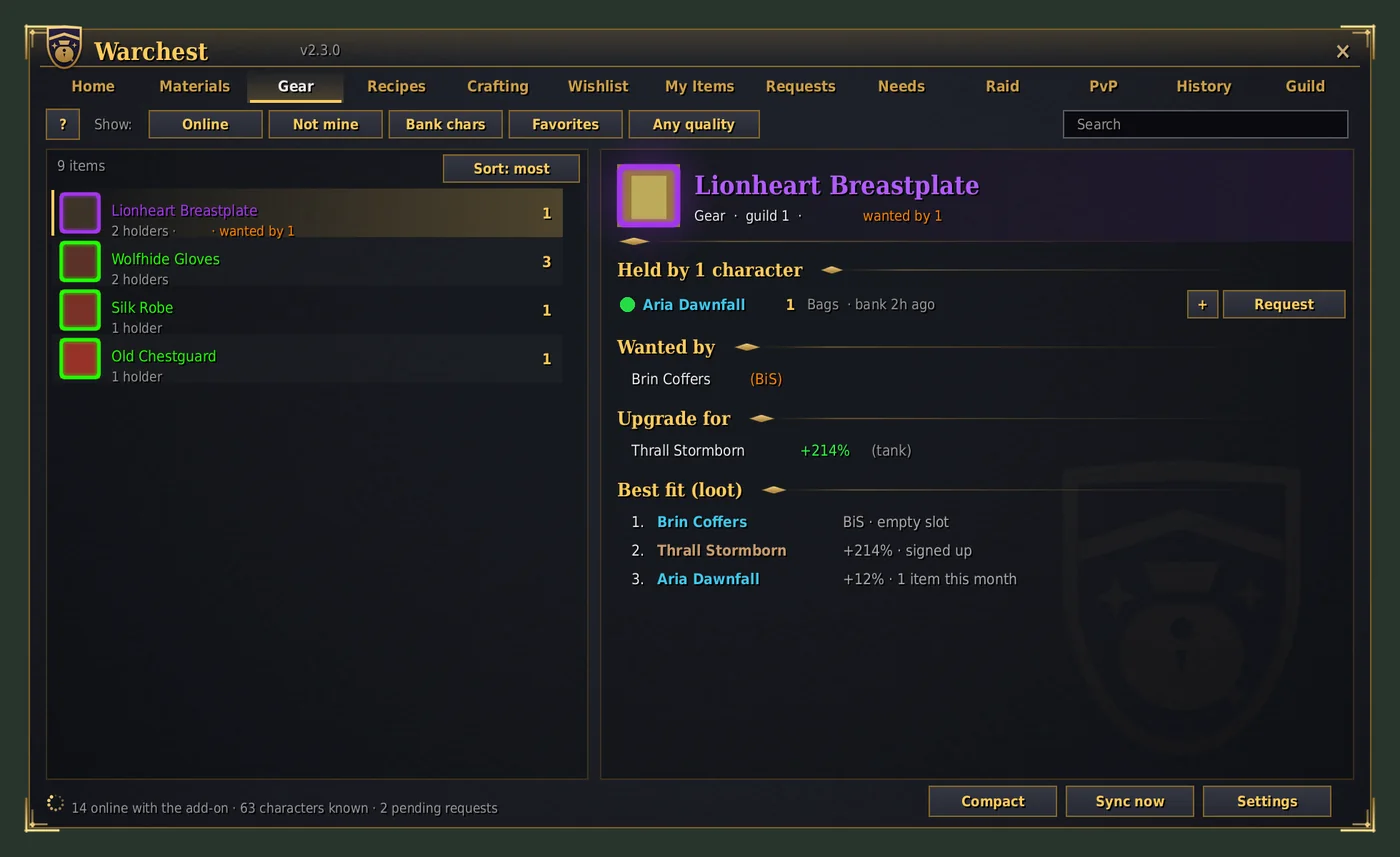
Press + instead of Request to collect items from several holders, then Requests tab > Send all: one mail per holder. Shift-click + to take everything someone has. For a craft, Request all on its shopping list asks the best holders for every material you're short.
Gear also shows Upgrade for, recipes show Learned by / Unlearned by, and officers see a Loot: best-fit line. Each line can be turned off; Compact tooltips hide the guild lines until you hold Shift.
At a mailbox, Send all sends every waiting Warchest mail in one go: what guildmates asked you for, mails you saved away from a mailbox, and guild needs you're helping with, each with the exact amount attached from your bags (stacks are split for you). If the game wants a click for each mail, the button says "Send (1 of 3)" and sends one per click. Send requested items does one request at a time if you'd rather check each mail. Opening your bank reminds you of requested items stored there.
Every item on all your characters with its exact location, including what you're wearing. Right-click one to send it to any player; the item is attached for you. /wc find thorium does the same in chat, and Characters shows every character's gold, professions and cooldowns.
Add items by typing, shift-clicking or dragging; pick a priority: BiS Normal Low. Holders see "Wanted by" on their tooltips, and you're told when a guildmate picks one up. /wc want thorium bar 3 adds it as BiS.
Everything guild members can craft, who can, their skill, and their cooldowns. Ask to craft sends a craft request that moves through accepted → materials received → crafting → sent.
If you know a recipe, its page compares the materials you have with what the guild has. Request all asks the best holders for everything you're short, in one go.
Your characters link themselves: each add-on publishes a random account token, so characters on the same account find each other. The main is the one you choose (Settings > Sharing, or /wc main Thrall), else your highest level.
Guild notes work too: Alt: Thrall Stormborn in an alt's public or officer note. Officers can force a link with /wc link Alt Name, Main Name. Officer fixes beat notes, and notes beat the automatic link.
/wc cd lists who has profession cooldowns ready. Recipe tooltips show who already knows it and who could still learn it, matched by profession and skill.
Your role for upgrade checks follows your specialization; pick one in Settings if you'd rather fix it. Upgrade checks compare class rules, level and role-weighted stats with what the character wears, and need at least +5% to show.
Small things that add up. They work on their own, and most can be switched off in Settings > Convenience.
One key (Keybindings > AddOns > Warchest) or /wc q opens a box for items, guildmates, pages and commands. Items show the guild's, the vault's and your counts; Enter on a guildmate starts a whisper. Start with /, or type /wc ?, to search only commands.
/wc track Thorium Bar 100 (or Track on an item) puts a small list on screen counting it on all your characters, with the guild's progress when it's a guild need. Shift-drag to move it; right-click a line to stop.
My Items > Characters: every character's gold and the total, professions, cooldowns, mail about to expire, items in the mail to it, and when you last saw its bags and bank.
Keep 20 healing potions in your bags: /wc refill Major Healing Potion 20. Opening your bank tops your bags up, and can put extras back.
Trading someone who asked you for something? Trade requested items puts exactly that in the trade, and completing it marks the requests sent. At a mailbox, Take from guildmates collects their attachments and gold (never COD mail).
At a repair vendor Warchest pays from guild funds when your rank allows it, otherwise from your own gold, and shows how much of the officers' repair budget you've used.
The ! button on the window (or /wc notices) keeps your last 50 notices. In dungeons, raids and battlegrounds, non-urgent notices wait there instead of popping up; PvP alerts still come through.
Guildmates without Warchest can type !wc Thorium Bar or !craft Flask of the Titans in guild chat. One online member's Warchest answers, and vault tabs are only counted if the asker's rank may see them.
Shift-click an item from Warchest into chat and it carries the guild's count: [Thorium Bar] (guild: 120).
Your settings are shared by all your characters already. To give a guildmate your setup, /wc settings export shows a line of text to copy; they paste it after /wc settings import.
A profession cooldown is ready on one of your characters; mail is about to expire; something a guildmate asked for landed in your bags; a request of yours has gone two days without an answer. Each appears once.
